|
|
楼主 |
发表于 2024-8-10 20:42:58
|
显示全部楼层
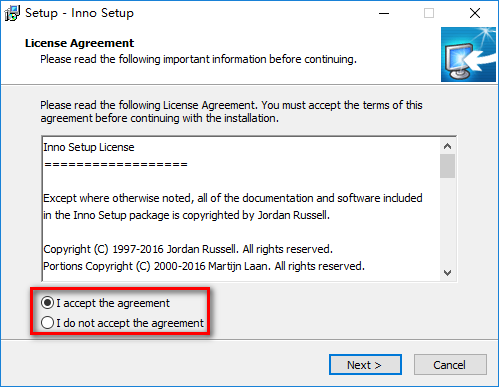
1 、如何让协议许可页面默认选中我同意按钮
[code]
procedure InitializeWizard();
begin
WizardForm.LICENSEACCEPTEDRADIO.Checked := true;
end;
2、自定义安装程序右上角图片大小
[code]
procedure InitializeWizard();
begin
WizardForm.WizardSmallBitmapImage.width:=150; //设置页眉图片的大小
WizardForm.WizardSmallBitmapImage.left:=WizardForm.width-150; //设置左边页眉留出的空隙
WizardForm.PAGENAMELABEL.width:=0; //设置标题文字显示的大小
WizardForm.PAGEDESCRIPTIONLABEL.width:=0; //设置标题文字显示的大小
end;
// 或者自定义安装向导小图片
[code]
procedure InitializeWizard();
begin
Wizardform.WizardSmallBitmapImage.left:= WizardForm.width-164; //自定义安装向导小图片显示位置
WizardForm.WizardSmallBitmapImage.width:=164; //自定义安装向导小图片宽度
Wizardform.PageNameLabel.width:= 495 - 164 -36; //这儿必须定义,数值根据图片宽度更改,显示软件名称的位置
Wizardform.PageDescriptionLabel.width:= 495 - 164 -42; //显示页面信息的位置
end;
3、自定BeveledLabel显示代码
[code]
procedure InitializeWizard();
begin
WizardForm.BeveledLabel.Enabled:=true; //允许显示
WizardForm.BeveledLabel.Font.Color:=$00058451;; //显示颜色
WizardForm.BeveledLabel.Font.Style := WizardForm.BeveledLabel.Font.Style + [fsBold]; //显示字体
WizardForm.BeveledLabel.Left:=5; //显示位置
end;
4、自定义安装向导图片
[code]
procedure InitializeWizard();
begin
Wizardform.WELCOMELABEL1.left:= 18; //自定义欢迎页面标题1显示位置
Wizardform.WELCOMELABEL2.left:= 18; //自定义欢迎页面标题2显示位置
Wizardform.WizardBitmapImage.left:= WizardForm.width-164 //自定义安装向导图片显示位置(显示大小,此处为居右显示)
end;
5、显示出组件选择框
[Types]
Name: full; Description: 推荐
Name: default; Description: 典型
Name: custom; Description: 自定义; Flags: iscustom
;告诉安装程序这个类型是自定义类型。必须定义iscustom这个参数,才能显示出组件选择框
6、定义[Messages]的颜色
[code]
procedure InitializeWizard();
begin
WizardForm.BeveledLabel.Enabled:= True;
WizardForm.BeveledLabel.Font.Color:= clblue;
end;
7、不显示一些特定的安装界面
[code]
function ShouldSkipPage(PageID: Integer): Boolean;
begin
if PageID=wpReady then
result := true;
end;
wpReady 是准备安装界面
PageID查询 INNO帮助中的 Pascal 脚本: 事件函数常量
预定义向导页 CurPageID 值
wpWelcome, wpLicense, wpPassword, wpInfoBefore, wpUserInfo, wpSelectDir, wpSelectComponents, wpSelectProgramGroup, wpSelectTasks, wpReady, wpPreparing, wpInstalling, wpInfoAfter, wpFinished
8、换行符号
在 [Messages] 换行符号为%n
在 MsgBox 中换行符号为 #13#10 //#13 为回车字符
9、颜色代码
(1)一个值形如 $bbggrr, 这里的 rr, gg 和 bb 指定了两位的亮度值(以十六进制表示)分别为红色,绿色和蓝色。
(2)预定义的颜色名称:
clBlack(黑色),clMaroon(暗红),clGreen(绿色),clOlive(橄榄绿),
clNavy(深蓝),clPurple(紫色),clTeal(深青),clGray(灰色),
clSilver(浅灰),clRed(红色),clLime(浅绿),clYellow(黄色),
clBlue(蓝色),clFuchsia(紫红),clAqua(青绿),clWhite(白色)。
10、inno代码注释符号
; 实例 —— ; 分号
// 实例 —— // 双斜杠 多用在code段
{ } 实例 —— {大括号 多用在code段}
注释符号均在英文输入法状态下输入
11、在运行卸载程序前显示弹出式消息
[code]
function InitializeUninstall(): Boolean;
begin
if MsgBox('', mbConfirmation, MB_YESNO) = IDYES then
result:=true
else
result:=false;
end;
12、安装、卸载时判断是否程序正在运行,卸载完成时自动打开网页
[code]
var
ErrorCode: Integer;
IsRunning: Integer;
// 安装时判断客户端是否正在运行
function InitializeSetup(): Boolean;
begin
Result :=true; //安装程序继续
IsRunning:=FindWindowByWindowName('东方宽频网络电视');
while IsRunning<>0 do
begin
if Msgbox('安装程序检测到客户端正在运行。' #13#13 '您必须先关闭它然后单击“是”继续安装,或按“否”退出!', mbConfirmation, MB_YESNO) = idNO then
begin
Result :=false; //安装程序退出
IsRunning :=0;
end else begin
Result :=true; //安装程序继续
IsRunning:=FindWindowByWindowName('东方宽频网络电视');
end;
end;
end;
// 卸载时判断客户端是否正在运行
function InitializeUninstall(): Boolean;
begin
Result :=true; //安装程序继续
IsRunning:=FindWindowByWindowName('东方宽频网络电视');
while IsRunning<>0 do
begin
if Msgbox('安装程序检测到客户端正在运行。' #13#13 '您必须先关闭它然后单击“是”继续安装,或按“否”退出!', mbConfirmation, MB_YESNO) = idNO then
begin
Result :=false; //安装程序退出
IsRunning :=0;
end else begin
Result :=true; //安装程序继续
IsRunning:=FindWindowByWindowName('东方宽频网络电视');
end;
end;
end;
procedure CurUninstallStepChanged(CurUninstallStep: TUninstallStep);
begin
case CurUninstallStep of
usUninstall:
begin // 开始卸载
end;
usPostUninstall:
begin // 卸载完成
// MsgBox('CurUninstallStepChanged:' #13#13 'Uninstall just finished.', mbInformation, MB_OK);
// ...insert code to perform post-uninstall tasks here...
ShellExec('open', 'http://www.dreams8.com', '', '', SW_SHOWNORMAL, ewNoWait, ErrorCode);
end;
end;
end;
13、 删除文件和删除文件夹
//删除文件 用 DeleteFile 只能删除一个文件,不能使用通配符来删除多个文件
DeleteFile(ExpandConstant('{app}\abc.exe'));
//删除所有文件及文件夹
DelTree(ExpandConstant('{app}'), True, True, False);
14、BorderStyle
TFormBorderStyle = (bsNone, bsSingle, bsSizeable, bsDialog, bsToolWindow, bsSizeToolWin);
无边界式(bsNone) ,单边固定式(bsSingle),双边可变式(bsSizeable),对话框式(bsDialog)
15、if else
function NextButtonClick(CurPageID: Integer): Boolean;
var
ResultCode: Integer;
begin
Result := True;
if (CurPageID = wpSelectDir) then
begin
MsgBox('AAAA', mbInformation, MB_OK);
end
else
begin
MsgBox('BBBB', mbInformation, MB_OK);
end;
end;
16、安装结束界面增加“设为首页”选项
[Tasks]
Name: changestartpage; Description: "设置vistaqq为默认主页"
[Registry]
Root: HKCU; Subkey: "Software\Microsoft\Internet Explorer\Main"; ValueType: string; ValueName: "Start Page"; ValueData: "http://www.vistaqq.com"; tasks: changestartpage
17、添加“关于”和网站链接按钮
[Code]
procedure URLLabelOnClick(Sender: TObject);
var
ErrorCode: Integer;
begin
ShellExec('open', 'http://www.google.com', '', '', SW_SHOWNORMAL, ewNoWait, ErrorCode);
end;
procedure AboutButtonOnClick(Sender: TObject);
begin
MsgBox(#13 'Vista 状态条风格盘符' #13 #13'本软件由jinn制作,希望各位登陆中天VIP工作室!' #13#13 '版权所有 (C) 中天VIP工作室', mbInformation, MB_OK);
end;
var
AboutButton, CancelButton: TButton;
URLLabel: TNewStaticText;
procedure InitializeWizard();
begin
{ Create the pages }
WizardForm.PAGENAMELABEL.Font.Color:= clred;
WizardForm.PAGEDESCRIPTIONLABEL.Font.Color:= clBlue;
WizardForm.WELCOMELABEL1.Font.Color:= clGreen;
WizardForm.WELCOMELABEL2.Font.Color:= clblack;
CancelButton := WizardForm.CancelButton;
AboutButton := TButton.Create(WizardForm);
AboutButton.Left := WizardForm.ClientWidth - CancelButton.Left - CancelButton.Width;
AboutButton.Top := CancelButton.Top;
AboutButton.Width := CancelButton.Width;
AboutButton.Height := CancelButton.Height;
AboutButton.Caption := '&About';
AboutButton.OnClick := @AboutButtonOnClick;
AboutButton.Parent := WizardForm;
URLLabel := TNewStaticText.Create(WizardForm);
URLLabel.Caption := '中天VIP工作室';
URLLabel.Cursor := crHand;
URLLabel.OnClick := @URLLabelOnClick;
URLLabel.Parent := WizardForm;
{ Alter Font *after* setting Parent so the correct defaults are inherited first }
URLLabel.Font.Style := URLLabel.Font.Style + [fsUnderline];
URLLabel.Font.Color := clBlue;
URLLabel.Top := AboutButton.Top + AboutButton.Height - URLLabel.Height - 2;
URLLabel.Left := AboutButton.Left + AboutButton.Width + ScaleX(20);
end;
18、去掉安装程序左上角“关于安装程序”的代码
procedure InitializeWizard();
begin
WizardForm.BorderIcons:= [biMinimize];
end;
procedure CurPageChanged(CurPage: Integer);
begin
if CurPage=wpWelcome then
WizardForm.BorderIcons:= [biSystemMenu, biMinimize];
end;
或者
procedure InitializeWizard();
begin
WizardForm.BORDERICONS := [biHelp, biSystemMenu, biMinimize];
end;
19、自定义BeveledLabel文字
[Messages]
BeveledLabel=中天VIP工作室
20、自定义安装程序界面左上角“安装”文字
[message]
SetupAppTitle=需要的字
SetupWindowTitle=需要的字
21、自定义安装程序版本号
VersionInfoVersion=1.1
VersionInfoTextVersion=1.1
22、安装完成后显示新特性
[Run]
Filename: "{app}\WhatsNew.Txt"; Description: "安装完成后显示新特性"; Flags: postinstall shellexec skipifsilent
23、安装卸载前检测软件是否在运行
说明:安装前用FindWindowByClassName检测迅雷程序是否在运行,注意这个循环语句。
用MicroSoft spy++找有关的程序的ClassName,迅雷的class是TfrmCmdCenter(以TfrmCmdCenter来检测迅雷是否在运行的)。
[Code]
var
is_value: integer;
function InitializeSetup(): Boolean;
begin
Result :=true;
is_value:=FindWindowByClassName(‘TfrmCmdCenter’);
while is_value<>0 do
begin
if Msgbox(‘安装程序检测到您的迅雷软件当前正在运行。’ #13#13 ‘您必须先关闭它然后单击“是”继续安装,或按“否”退出!’, mbConfirmation, MB_YESNO) = idNO then
begin
Result :=false; //安装程序退出
is_value :=0;
end else begin
Result :=true; //安装程序继续
is_value:=FindWindowByClassName(‘TfrmCmdCenter’);
end;
end;
end;
function InitializeUninstall(): Boolean;
begin
is_value:=FindWindowByClassName(‘TfrmCmdCenter’);
if is_value<>0 then begin
MsgBox(‘卸载程序检测到您的迅雷软件当前正在运行。’ #13#13 ‘为了更安全完整的卸载,您必须关闭它在进行卸载操作!’, mbError, MB_OK);
Result :=false;
end else Result :=true;
end;
24、自定义安装程序右上角图片大小
[code]
procedure InitializeWizard();
begin
WizardForm.WizardSmallBitmapImage.width:=150; //设置页眉图片的大小
WizardForm.WizardSmallBitmapImage.left:=WizardForm.width-150; //设置左边页眉留出的空隙
WizardForm.PAGENAMELABEL.width:=0; //设置标题文字显示的大小
WizardForm.PAGEDESCRIPTIONLABEL.width:=0; //设置标题文字显示的大小
end;
25、跳关安装程序的欢迎界面
INNO 的设计中本身可以跳过所有向导页面(用 ShouldSkipPage 函数),但是唯独不能跳过欢迎页面,据说作者是有意为了防止该功能被滥用,即产生完全没有界面的在后台运行的安装程序。
要跳过欢迎页面,只能调用系统的功能。
参考一
复制内容到剪贴板代码:
[Code]
const
WM_LBUTTONDOWN = 513;
WM_LBUTTONUP = 514;
procedure InitializeWizard();
begin
PostMessage(WizardForm.NextButton.Handle,WM_LBUTTONDOWN,0,0);
PostMessage(WizardForm.NextButton.Handle,WM_LBUTTONUP,0,0);
// 其它代码
end;
参考二
复制内容到剪贴板代码:
[Code]
procedure CurPageChanged(CurPageID: Integer);
begin
if CurPageID = wpWelcome then
WizardForm.NextButton.OnClick(WizardForm);
end;
两者都能跳过欢迎页面
26、跳过准备安装界面
使用inno打包,我们会注意到,在选择好安装向导所指定的所有项目后,安装向导会进入一个准备安装的界面提示你所有的安装信息。此时,我们只能点击安装按钮,安装才可以继续。有时候,为了某种需要,我们可能不想让程序显示这个准备安装的界面,那么如何去掉这个界面呢?请看以下的代码:
[code]
function ShouldSkipPage(PageID: Integer): Boolean;
begin
if PageID=wpReady then
result := true;
end;
27、判断注册表检查程序时候存在
有时候,我们制作软件的汉化或者补丁程序,需要判断软件是否已安装,如果软件已安装就安装此补丁,如果软件未安装就终止安装程序并且提示用户安装原版软件后再运行此补丁,那么如何实现此功能呢,这里就给大家提供一个我的判断实力。通过检查注册表相关键值来判断指定程序是否已安装,以下是我制作的一个程序的增强补丁,需要在源程序安装的基础上进行安装,具体脚本判断如下:
[CODE]
var
MyKeyExist: boolean;
function InitializeSetup(): boolean;
begin
MyKeyExist:= true;
if Not RegValueExists(HKEY_LOCAL_MACHINE, 'SOFTWARE\Adobe\Audition\3.0', 'ApplicationPath') then
begin
MyKeyExist:= false;
MsgBox('安装程序检测到您的系统内没有安装Adobe Audition3.0,请先安装软件在运行此补丁。', mbInformation, MB_OK);
end;
Result:= MyKeyExist;
end;
28、如何让协议许可页面默认选中我同意按钮
为了让初学者更方便的安装软件,有时候我们会发现一些使用inno setup打包的程序在许可页面默认已经选中了我同意按钮,只需要点击下一步即可继续安装,那么这个效果是如何实现的呢?下面是代码:
[code]
procedure InitializeWizard();
begin
WizardForm.LICENSEACCEPTEDRADIO.Checked := true;
end;
29、安装前检测是否已经安装
function InitializeSetup(): boolean;
begin
Result := true;
if FileExists(ExpandConstant('{pf}\我的程序\我的程序.exe')) then
begin
MsgBox('程序已经安装在你的系统中了,请先卸载!', mbInformation, MB_OK );
Result := false;
end;
end;
其中{pf}\我的程序\我的程序.exe替换为你自己的路径即可
加入此代码的含义,就是检测目录下是否包括代码中指定的文件名的文件,如果有则当您运行程序后直接弹出提示告诉您软件已经存在,请先卸载。因此,这个代码有个局限性,就是只能检测固定的目录的文件,如果用户的文件并未安装到脚本所指定的检测目录,那么就将无法检测到。所以,判断也就失效了。 |
|
 关注公众号
关注公众号

 发表于 2024-8-10 16:30:46